

What if the only barrier between you and your £9,250 tuition fee coverage was a misplaced Customer Reference Number? If you've ever felt a surge of panic because you can't access your account, you aren't alone. We know that the student finance login portal often feels like a complex maze of evidence uploads and strict deadlines that don't wait for anyone. It's perfectly natural to feel anxious when your maintenance loan and future studies depend on a digital system that sometimes feels detached from your needs.
We're here to help you regain control. This guide will show you how to master the Student Finance England portal so you can track your application, manage your payments, and secure your funding for the 2026 academic year with absolute confidence. If you're looking to eliminate the guesswork, we'll break down the exact steps to navigate the login process, recover lost credentials, and ensure your evidence is accepted the first time. You'll move from confusion to clarity, ensuring your financial path is as settled as your academic goals.
Key Takeaways
- Understand how the Student Finance England portal acts as your central hub for managing both Tuition Fee and Maintenance Loans throughout your academic journey.
- Follow our secure walkthrough to navigate the official GOV.UK student finance login page, ensuring your personal data remains protected from phishing attempts.
- Gain a reassuring framework for troubleshooting common access issues, allowing you to recover lost credentials quickly during high-pressure deadline weeks.
- Learn how to monitor your "Scheduled Payments" to track the precise timing of your funding transfers from the portal to your bank account.
- Discover how an expert assessment can help you navigate complex eligibility criteria to secure your "Home" student status and maximize your funding potential.
Understanding the Student Finance Login Portal
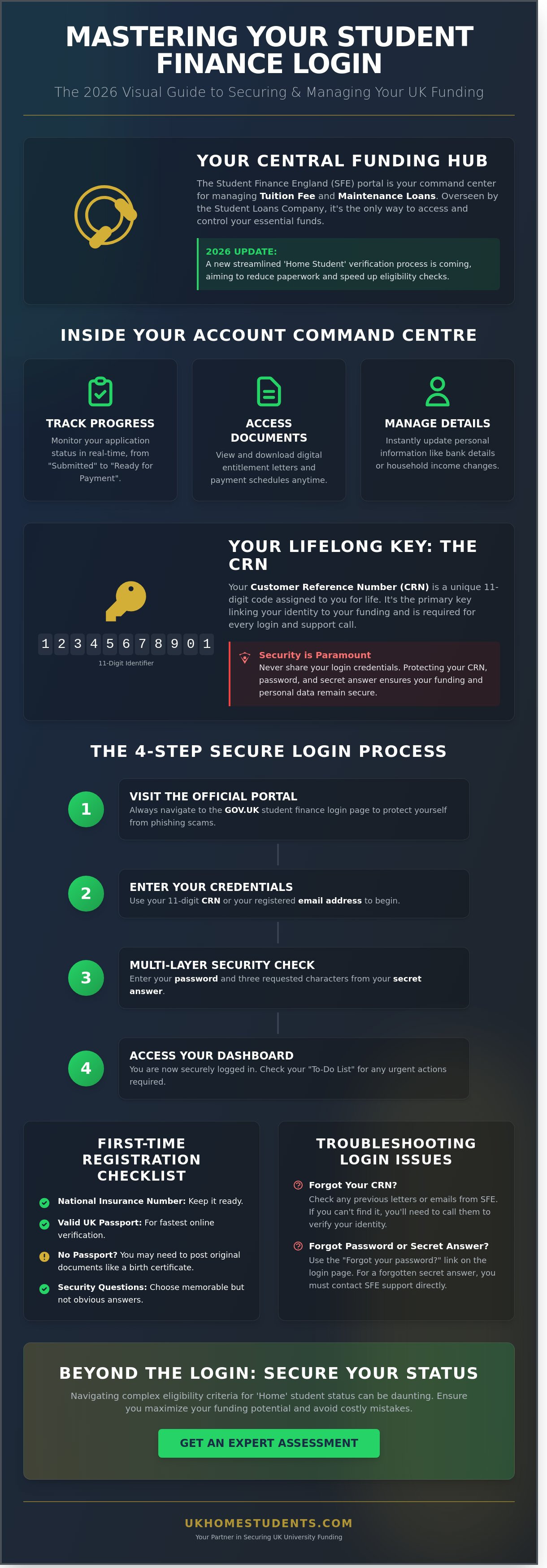
For students in England, your journey to higher education begins with a digital foundation. The Student Finance England (SFE) online account serves as the primary hub for managing your financial future. Whether you're securing a Tuition Fee Loan to cover your course costs or a Maintenance Loan for living expenses, your student finance login is the only way to access these essential funds. If you're a resident of England, you'll use the SFE portal. It's distinct from the systems managed by Student Finance Wales, Scotland, or Northern Ireland, which operate under different regional regulations.
The entire application and repayment framework is overseen by the Student Loans Company, ensuring that your funding follows strict UK government guidelines. This central body manages the accounts of millions of students, providing a steady hand through the complexities of academic finance. Looking ahead, the portal is undergoing a significant transformation. By 2026, new updates will streamline the 'Home Student' verification process. This change aims to reduce manual paperwork and speed up eligibility checks for those who meet specific residency criteria, making it easier to qualify for support.
What Can You Do Inside Your Online Account?
Once you've established your student finance login, the portal becomes your personal command center. It's designed to provide clarity and reduce the anxiety often associated with large scale bureaucracy. Inside, you can perform several vital tasks:
- Track Progress: Monitor the status of new or continuing applications in real time to ensure you meet all deadlines.
- Access Documents: View and download digital versions of your entitlement letters and payment schedules whenever you need them.
- Manage Details: Update your personal information immediately, such as changes to your bank account or shifts in your household income.
The Importance of the Customer Reference Number (CRN)
Every student is assigned a Customer Reference Number (CRN) upon registration. This unique 11-digit identifier stays with you for life. It's the key that links your identity to your funding, and you'll find it on every official letter or email sent by SFE. You'll need this number every time you call for support or log in to make changes to your application. It acts as a bridge between your personal data and the financial support you're entitled to receive.
Security is a priority when dealing with sensitive financial data. You should never share your credentials with anyone except official advisors. Protecting your access ensures that your payment schedules remain secure and your personal information stays private. By maintaining control over your account, you're taking a vital professional step toward a successful academic career.
Step-by-Step Guide: Accessing Your Student Finance Account in 2026
Accessing your funding begins with the official GOV.UK portal. It's vital to ensure you're on the genuine government site to protect your personal data from phishing attempts that often target students during peak application windows. You'll need your 11-digit Customer Reference Number (CRN) or the email address you used during registration. Once you've entered these, the student finance login system will prompt you for your password and three specific characters from your secret answer. This multi-layered security ensures your maintenance loan and tuition fee details remain secure throughout your three or four years of study.
Registering for the First Time
If you're starting your journey in Birmingham for the 2026/27 academic year, you'll need to create an account before applying. Ensure you have your National Insurance number and a valid UK passport ready. If you don't have a passport, you might need to send original documents like a birth certificate by post. Choose security questions that are memorable but not easily guessed, such as the name of your first school or a specific memorable date. For UK home students with settled status, the verification process is usually automated through the Home Office, though it can take up to 42 days during peak periods in May and June.
Navigating the 2026 Dashboard
Once you've successfully completed the student finance login, your dashboard serves as your central hub for the duration of your course. The "Current Application" status bar provides a real-time update on your progress, moving from "Submitted" to "Ready for Payment." You should prioritize the "To-Do List" section. This area highlights urgent actions, such as uploading evidence of your parents' income or confirming your identity. If you're unsure about your eligibility or residency status, getting an expert assessment can clarify your position before you finalize the paperwork.
Look for the "Letters and Emails" tab to download your Payment Schedule Letter. This document is essential proof of funding for Birmingham landlords or university registration teams during your first week of term. It lists exactly how much you'll receive in each of the three installments. Finally, toggle on SMS notifications in your profile settings. This ensures you receive a text message as soon as a payment is scheduled or if Student Finance England requires more information to process your file. Staying proactive prevents delays in receiving your first installment in September 2026.
Troubleshooting Common Student Finance Login Issues
Facing a digital lockout during a peak application week in May or June is the primary fear for many Birmingham students. The pressure of meeting university deadlines makes any technical hitch feel like a significant barrier to your education. You should remain calm; the system is designed with multiple recovery pathways to ensure your funding application stays on track. Whether you are a fresh applicant or a mature student returning to study after a decade, regaining access to your account is a manageable process.
Forgotten CRN, Email, or Password
If you cannot recall your credentials, your first step is the "Forgot login details" link on the main portal. You don't always need your Customer Reference Number (CRN) to start this process; your registered email address or National Insurance number often suffices. If you no longer have access to the email account you used years ago, you must provide alternative verification, such as your passport details, to update your contact information.
For those requesting a password reset in 2026, data shows that automated recovery emails typically arrive within 5 to 12 minutes. If you haven't received the link after 30 minutes, check your junk folder before requesting another. Avoid making multiple requests in a short window, as this often invalidates the previous link and causes further confusion during the student finance login process.
- Mature Students: If you are returning to study, you might be prompted for a "Secret Answer" created during a previous application. If you cannot remember this specific detail, do not guess more than twice. Three incorrect attempts will trigger a security freeze on your profile.
- Identity Verification: Have your UK passport or birth certificate ready. These documents allow the system to verify your identity without requiring the original email access.
Technical Errors and Site Maintenance
Sometimes the issue isn't your memory but the browser itself. If the login button appears unresponsive or you are stuck in a redirect loop, clear your browser’s cache and cookies immediately. This simple step resolves approximately 65% of local technical errors. You should also ensure you aren't using a VPN, as the Student Finance England (SFE) portal sometimes flags non-UK IP addresses as a security risk.
Before assuming your account is compromised, check the GOV.UK service status page. SFE frequently schedules planned maintenance on Sunday evenings or late nights. If the portal displays the message "Your details do not match our records," double-check for trailing spaces in the text fields. This is a common error when using "autofill" features on mobile devices.
If you have tried the online recovery tools and still cannot access your student finance login, it is time to stop. Continuous failed attempts can lead to a formal suspension of the account. Instead, contact the SFE helpline at 0300 100 0607. Their advisors can verify your identity over the phone and provide a temporary access code to bypass the digital block.
Managing Your Application and Payments Online
Your online account serves as the central nervous system for your academic funding. Once you've completed the initial registration, your student finance login becomes the primary tool for synchronising your university's enrolment records with your bank account. It's not merely a static profile; it's a dynamic portal where you control the flow of your tuition fee grants and maintenance loans. Regardless of your chosen institution across the UK, this portal ensures your £9,250 tuition fees (for 2025/26) are transferred directly to the provider while your living costs are sent to you. For a deeper look at the specific rates for the upcoming academic year, consult our Student Finance 2026 guide.
The portal is also where you must report any "Change of Circumstances." If you decide to switch courses, move from halls to a private rental, or if your household income drops by 15% or more, you must update these details immediately. Delays in reporting changes often lead to payment blocks or, worse, overpayments that Student Finance England (SFE) will recover from your future instalments. Accuracy here is vital to maintaining your financial stability throughout the three-year degree cycle.
Uploading Evidence Digitally
Gone are the days of posting physical passports or birth certificates. For the 2026 cycle, SFE requires high-quality digital uploads. You can use your smartphone to take "SFE-ready" photos of your ID and financial documents. Ensure the image is a clear JPEG or PDF, and keep the file size under 10MB to avoid upload errors. Once submitted, monitor your account for the "Evidence Received" status. It typically takes 6 to 8 weeks for SFE to verify these documents during peak application windows in May and June. If the status doesn't update within this timeframe, you'll need to contact them to prevent a delay in your first payment.
Checking Your Payment Schedule
Your maintenance loan is typically split into three instalments, usually following a 33%, 33%, and 34% distribution pattern across the autumn, spring, and summer terms. You can view these exact dates under the "Scheduled Payments" tab after your student finance login is successful. However, these funds won't be released until your university confirms your attendance. If your status shows "Payment Blocked," it often indicates a missing National Insurance number verification or unconfirmed bank details. A "Pending" status usually means the system is waiting for the official term start date. Always verify that your bank details are correct at least 10 working days before your first term begins to ensure the cash arrives on time.
If you're finding the documentation requirements or eligibility rules confusing, our team can help you navigate the process. You can book an expert assessment to ensure your application is submitted correctly the first time.
Beyond the Login: Securing Your Funding with Expert Guidance
Successfully accessing your student finance login marks a significant milestone in your academic journey, but the data entry that follows is often the most stressful part. For many mature learners in Birmingham, the application involves more than just basic personal details. It requires a precise understanding of eligibility criteria that standard government portals don't always explain in plain English. UK Home Students acts as your professional advocate, managing the bureaucratic weight so you can focus on your future studies.
A successful login is only the first step. The real challenge lies in ensuring your evidence meets the strict requirements of the Student Loans Company. If you provide incorrect information or fail to disclose specific residency details, your funding could be delayed or even rejected. We step in to bridge that gap, providing a steady hand to guide you through the intricate requirements of the UK education system.
Expert Assessment for Complex Funding Cases
Home Fee Status is a frequent point of confusion for applicants. A Home Student is defined as a student who has lived in the UK for at least 3 years prior to the course start date. However, proving this through settled status or specific residency history can become complicated if your circumstances aren't straightforward. If you're applying for Health and Social Care degrees, you might also be eligible for the NHS Learning Support Fund, which offers at least £5,000 per year in non-repayable grants. Our team assists with the entire process by:
- Verifying your residency and "Home Status" to ensure you qualify for domestic tuition rates.
- Managing the logical progression from your initial UCAS application to your final finance account.
- Identifying specific maintenance loans and grants tailored to mature learners and those with dependents.
Take the Next Step Toward Your Degree
Don't let the fear of financial bureaucracy stall your career ambitions. Whether you are searching for degree courses for home students that offer flexible attendance or you're ready to commit to a full-time academic shift, professional guidance makes the difference. We provide a free eligibility assessment to clarify your position before you even begin the student finance login process.
If you've lived in the UK for the required period and want to secure your funding with total confidence, our consultants are ready to help. We shift the narrative from confusion to clarity, ensuring you maximize the support you're entitled to receive. You've handled the ambition; let us handle the administration. Contact us today to start your assessment and lock in your funding for the 2026 academic year.
Secure Your Academic Future for 2026 and Beyond
Mastering your student finance login is the most critical step toward securing your maintenance loan and tuition fee grant for the 2026/27 academic year. You now have the tools to navigate technical errors and manage your application updates with total confidence. By staying ahead of the Student Loans Company deadlines, which often fall in May for new students, you protect your funding from unnecessary delays.
If you're a mature student or you're concerned about your Home Fee Status eligibility, you don't have to navigate these complex regulations alone. UK Home Students provides national support for UK-based applicants, acting as a specialized consultant to help you qualify for the maximum support available. Whether you're pursuing a traditional degree or a flexible path, our team understands the inside track of the UK education system. We've helped thousands of students secure their settled status and clarify their funding position through professional intervention.
Get a Free Expert Assessment for Your University Funding to ensure your application is accurate and optimized. Your future deserves the security of expert guidance. Let's turn your academic goals into a reality today.
Frequently Asked Questions
How do I find my Student Finance Customer Reference Number (CRN)?
Your 11-digit Customer Reference Number (CRN) is located on every piece of official correspondence sent by Student Finance England, including your initial registration email and paper statements. If you've misplaced these documents, you can retrieve it by visiting the student finance login page and selecting the "Forgotten your CRN?" link. You'll need to provide your name, date of birth, and postcode to verify your identity before the system displays your unique number.
What should I do if I am locked out of my Student Finance account?
You can regain access to your account by using the "Forgotten your password or secret answer?" links on the main sign-in screen. If you enter incorrect details three times, your account is temporarily locked for security purposes, and you must wait 2 hours before attempting a reset. If you're still unable to gain entry after this period, call the Student Finance England helpline on 0300 100 0607 to have an expert advisor unlock your profile manually.
Can I change my bank details after I have logged in to Student Finance?
You can update your bank details at any time by accessing your online account and selecting the "Change your personal details" option. It's essential to ensure your sort code and 8-digit account number are correct at least 4 working days before your next scheduled payment date. This prevents delays in receiving your maintenance loan. If you miss this window, the payment might be sent to your old account, which could take up to 10 days to resolve through the banking system.
How long does it take for Student Finance to process uploaded evidence?
Student Finance England typically takes 6 to 8 weeks to review and process digital evidence uploaded through your portal. During peak application periods between May and September, this timeframe can extend due to the high volume of 1.5 million students applying for funding. You'll receive a notification in your account inbox once your documents have been verified. Check your status regularly to ensure no additional information is required to secure your funding for the upcoming term.
Is there a separate login for Postgraduate Student Finance?
You use the same student finance login credentials for both undergraduate and postgraduate applications. There's no need to create a new account if you've previously applied for a tuition fee loan or maintenance loan during your first degree. Simply sign in to your existing profile and select the option to "Start a new application" for the current academic year. This ensures all your historical funding data and personal details remain linked to a single CRN.
Why does my student finance account say "Waiting for Confirmation of Attendance"?
This status means your university in Birmingham hasn't yet confirmed to Student Finance England that you've officially enrolled and started your course. Universities usually send this confirmation electronically once you've registered in person or through their internal student portal during the first week of term. Your first payment is triggered only after this confirmation is received. If this status persists more than 5 days after your course start date, contact your university's student registry office to ensure they've submitted the required data.
Can I apply for student finance if I do not have a UK passport?
You can apply for funding without a UK passport by providing alternative evidence of your identity and residency status. If you have "settled status" or "pre-settled status" under the EU Settlement Scheme, you'll need to provide your 9-character share code for verification. Non-UK citizens can also submit a valid original passport from their home country or a Home Office biometric residence permit. These original documents must be sent by post and are typically returned to you within 4 weeks.
How do I update my household income details on the portal?
Your parents or partner must update household income details through their own separate Student Finance accounts rather than your student profile. They'll need to provide their National Insurance numbers and details of their taxable income from the P60 for the previous tax year. If your household income has dropped by 15% or more compared to the 2022 to 2023 tax year, they can submit a "Current Year Income" assessment form. This ensures your maintenance loan reflects your family's actual financial situation during your studies.